
With Windows 10 support ending in October 2025, many organisations are upgrading to Windows 11. But there's a hidden challenge: wireless authentication breaks by default on domain-joined machines if you're still using legacy protocols like PEAP-MSCHAPv2.
The Problem
Starting with Windows 11 Enterprise and Education version 22H2, compatible systems have Windows Defender Credential Guard enabled by default.
When this is turned on, devices can no longer use their domain machine account to authenticate to wireless networks if they rely on legacy protocols such as PEAP_MSCHAPv2.
Why Now?
With Windows 10 reaching end of support on October 14, 2025, many organisations are already upgrading to Windows 11. This makes addressing wireless authentication compatibility an urgent priority, otherwise users risk being locked out of Wi-Fi access after migration.

Our Recommendation
Switchshop strongly recommends migrating domain-joined machines from machine authentication to certificate-based authentication.
This ensures:
- Ongoing compatibility with Windows 11 and future Microsoft updates.
- Stronger security than legacy password-based methods.
- Alignment with Microsoft Entra ID and a cloud-ready authentication strategy.
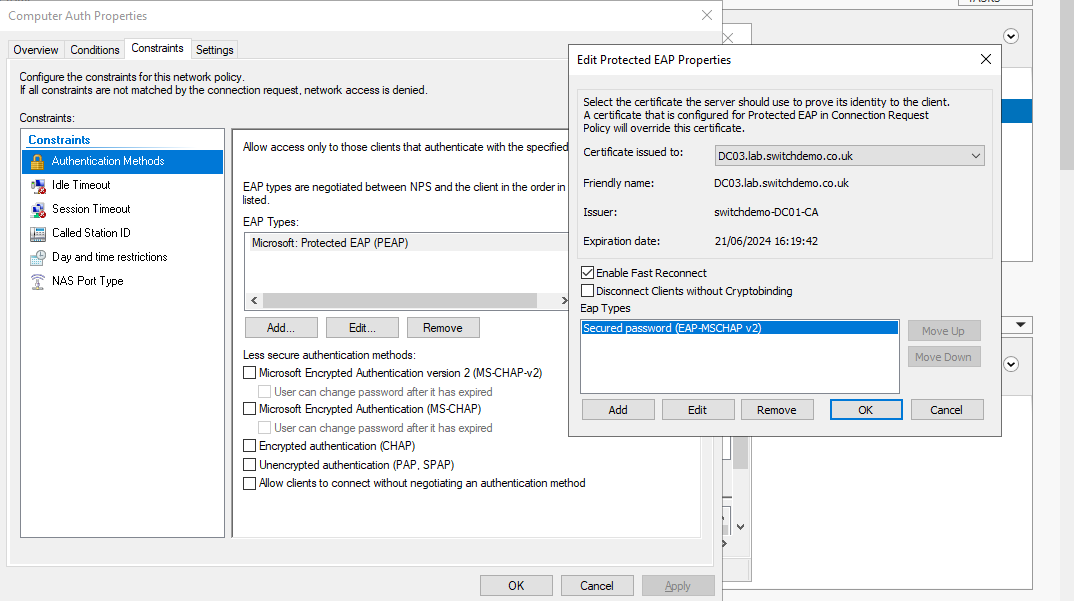
How to Identify if You’re Affected
- Open your Windows NPS server
- Navigate to Network Policies and locate the policy used for domain machines
- Go to Constraints and click Edit
- If you see “Secure Password (EAT-MSCHAPv2)” selected. You are likely to be affected
Why This Matters
- When Credential Guard is enabled, NTLM classic authentication cannot be used for single sign-on.
- You will be forced to manually enter credentials for protocols that rely on MS-CHAPv2.
- Wi-Fi and VPN endpoints using MS-CHAPv2 are at risk of the same vulnerabilities as NTLMv1.
- Microsoft recommends moving to certificate-based authentication methods such as PEAP-TLS or EAP-TLS.
How Switchshop Can Help
We can assist with the migration to certificate-based authentication. Typically, this setup requires around 4 hours of consultancy time from our engineers, depending on your environment.
- Ensure compliance and security
- Avoid authentication failures
- Future-proof your wireless network
