

Every September, UK universities face a predictable stress test. Tens of thousands of students arrive on campus, each carrying two or three connected devices, and the network that performed adequately during summer suddenly has to support lecture-theatre Wi-Fi for 500 simultaneous users, BYOD onboarding for halls of residence, eduroam roaming across buildings, and research data transfers that cannot tolerate packet loss.
For IT directors and network managers in higher education, the challenge is not simply bandwidth. It is designing infrastructure that remains resilient, secure, and compliant under sustained peak demand while accommodating devices you do not own or control.
This guide covers the architecture, security, support, and procurement considerations that define a reliable BYOD campus network. Switchshop, a technically led UK infrastructure partner with 25+ years of experience and the highest Fortinet and HPE Aruba accreditations in the country, works with universities to design and deliver exactly this kind of network.

Key Takeaways: Reliable BYOD Campus Networks for UK Universities
- BYOD-heavy campus networks require architecture designed for peak demand, not average load, to avoid freshers’ week failures.
- Network segmentation, certificate-based authentication, and zero-trust principles protect institutional data from unmanaged devices.
- Wi-Fi 6E and Wi-Fi 7 access points are now essential for high-density lecture theatres supporting 1,000+ concurrent connections.
- Switchshop provides end-to-end campus network design, deployment, and 24/7 support through Jisc framework-approved procurement routes.
- Proactive monitoring and NCSC-aligned security frameworks reduce incident response times and strengthen regulatory compliance.
Why BYOD Creates Unique Network Challenges for UK Universities
Bring Your Own Device policies are now standard across UK higher education. Students, academics, and visiting researchers connect personal laptops, tablets, and smartphones alongside university-managed endpoints, IoT sensors, and AV equipment. A mid-sized university campus can process over 30,000 device authentication requests per hour during the start of term.
This device diversity introduces complexity at every layer of the network. Unlike managed corporate environments where IT teams control hardware specifications and security configurations, a BYOD campus must accommodate devices running different operating systems, varying encryption capabilities, and inconsistent patch levels. Each unmanaged device is a potential entry point for threats.
The operational consequence is clear: a network designed for average-term traffic will fail during peak enrolment, exam periods, and open days. Reliable BYOD campus infrastructure requires architecture that anticipates these surges and maintains consistent performance across all user groups.
How to Design Campus Network Architecture for Peak Demand
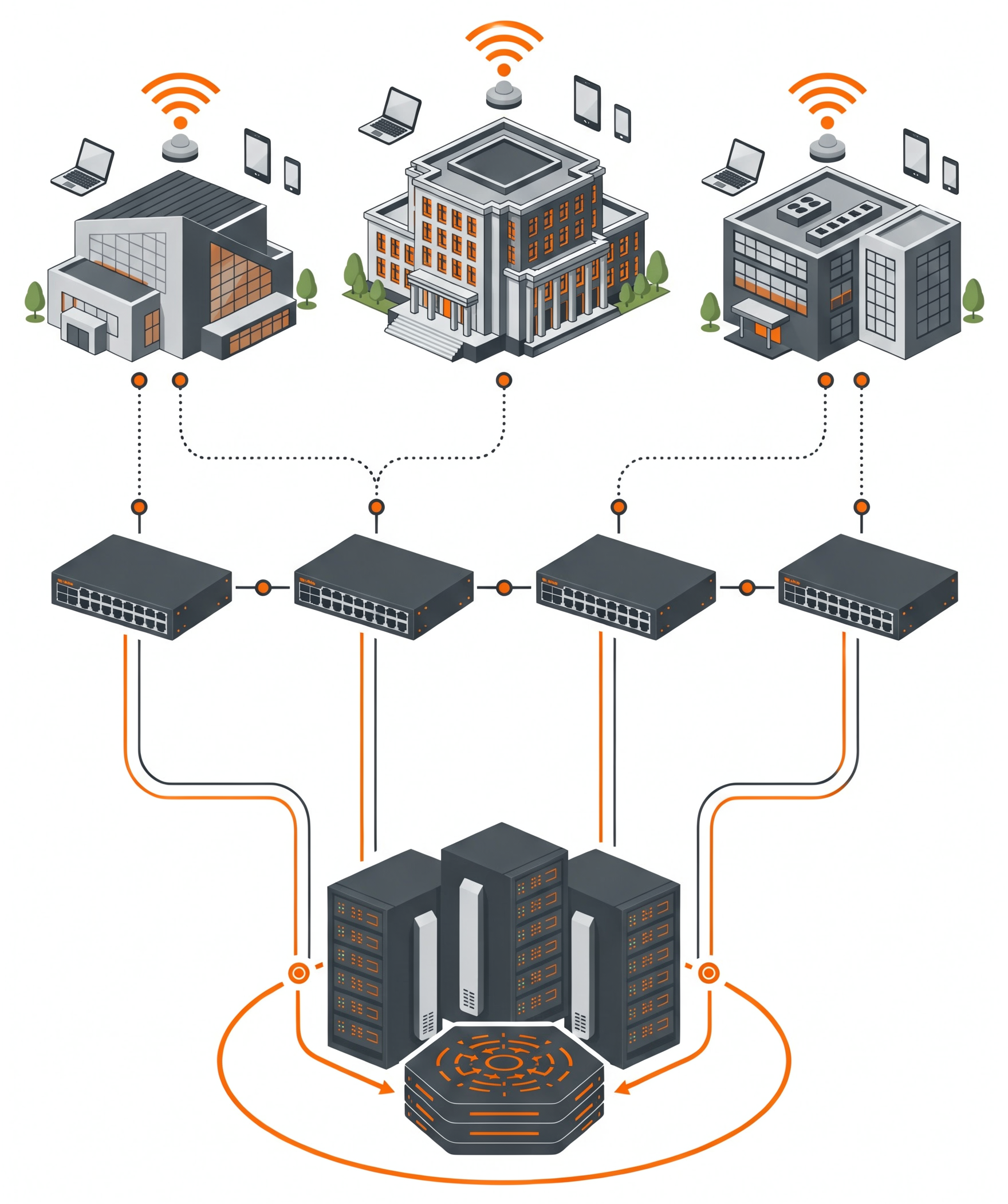
The most widely adopted model for campus networks is the three-tier hierarchical architecture: access, distribution, and core layers. Each tier serves a distinct function in delivering scalable, resilient connectivity across multi-building estates.
Access Layer: Connecting Every Device
The access layer is where end users and their devices connect to the network, whether through wired Ethernet or wireless access points. In a university context, this layer handles BYOD onboarding, port-level security, and Power over Ethernet (PoE) for IP phones and access points. Careful positioning of access points is critical in high-density environments such as lecture theatres, libraries, and student unions.
For lecture halls seating 500 or more students, predictive Wi-Fi 6E and Wi-Fi 7 designs should be validated to support concurrent connections from multiple devices per seat. Historical data from universities shows that peak access point loads can reach 1,000 devices simultaneously in the largest teaching spaces.
Distribution Layer: Policy Enforcement and Traffic Management
The distribution layer aggregates multiple access switches, enforces routing policies, and applies Quality of Service (QoS) rules to prioritise traffic types. In a campus environment, this is where traffic from academic applications, research computing, video conferencing, and recreational browsing is separated and managed according to institutional priorities.
VLAN segmentation at this layer is essential for isolating BYOD traffic from sensitive research and administrative systems. Dynamic VLAN assignment, driven by 802.1X authentication, ensures each device is placed on the correct network segment the moment it connects.
Core Layer: The High-Speed Backbone
The core layer provides the high-speed backbone connecting distribution blocks, data centres, and internet uplinks. For UK universities connected to JANET (the UK research and education network), core infrastructure must support 10G and 100G uplinks with redundant paths to maintain continuity during hardware failures or maintenance windows.
Redundancy at every tier is the single most important resilience factor. Dual uplinks with automatic failover between distribution and core layers prevent a single switch failure from isolating an entire building or faculty. Universities that have invested in this redundancy consistently achieve 99.5% or higher network uptime.
Choosing the Right Wireless Infrastructure for Campus BYOD
Wireless access points are the most visible component of any BYOD campus network, and the choice of hardware directly affects user experience, security capabilities, and long-term scalability.
Wi-Fi 6E and Wi-Fi 7 for High-Density Environments
Wi-Fi 6E extends the available spectrum into the 6 GHz band, offering more non-overlapping channels and reduced interference in crowded environments. For lecture theatres, conference venues, and open-plan study spaces where hundreds of devices compete for airtime, this additional spectrum is the difference between reliable connectivity and frustrating dropouts.
Wi-Fi 7 builds on this foundation with multi-link operation (MLO), allowing devices to transmit and receive across multiple frequency bands simultaneously. For research environments generating large data transfers alongside routine academic traffic, this capability provides measurable throughput improvements.

Site Surveys and Predictive Design
Deploying access points without a comprehensive site survey is a common and expensive mistake. Building materials, ceiling heights, furniture layouts, and sources of electromagnetic interference all affect wireless propagation. A predictive site survey models coverage patterns and capacity requirements before any hardware is installed, reducing costly post-deployment adjustments.
Universities should also plan for seasonal variation. A lecture theatre that seats 50 during summer revision may seat 500 during freshers’ week induction sessions. Access point density and configuration must accommodate the peak scenario, not the average.
Eduroam Integration at Scale
Eduroam remains the backbone of academic wireless mobility, operating across more than 100 countries and enabling visiting researchers and students to connect using their home institution credentials. Supporting eduroam at scale requires a properly configured RADIUS infrastructure with federation to the UK national proxy via Jisc.
Dynamic VLAN assignment within the eduroam architecture ensures that authenticated users receive the correct network policy wherever they connect on campus. This eliminates per-location configuration and significantly reduces helpdesk calls from users who cannot connect after moving between buildings.
Securing a BYOD Campus Network with Zero-Trust Principles
A BYOD environment extends the network perimeter to every unmanaged device on campus. Traditional perimeter-based security models, where the network edge was assumed to be trustworthy, do not hold in an environment with thousands of personal devices connecting from lecture theatres, halls of residence, and outdoor spaces.
The NCSC’s zero trust architecture design principles provide a practical framework for UK universities. The core principle is straightforward: never trust, always verify. Every device, user, and connection is authenticated and authorised based on policy, regardless of whether it originates inside or outside the campus network.
Certificate-Based Authentication for BYOD
Password-based Wi-Fi authentication is a known vulnerability in BYOD environments. Shared credentials can be compromised, and legacy PEAP/MSCHAPv2 protocols are susceptible to credential-harvesting attacks. Certificate-based authentication using EAP-TLS eliminates these risks by requiring each device to present a unique, cryptographically signed certificate before it is granted network access.
Switchshop’s MySSP Onboard platform automates this process for universities and colleges. Users install certificates via a guided web interface in minutes, with the platform automatically detecting the device type and delivering the correct certificate for Android, iOS, Windows, macOS, and ChromeOS. This removes the manual IT overhead traditionally associated with certificate deployment at scale.
Network Segmentation and Micro-Segmentation
Effective segmentation isolates different classes of traffic to contain the blast radius of any security incident. A well-designed campus network should maintain separate SSIDs and VLANs for at least four categories: staff, students, guests, and IoT devices. Each segment applies its own access control policies, bandwidth limits, and monitoring rules.
Micro-segmentation goes further by restricting lateral movement within each VLAN. If a compromised BYOD device gains access to the student network, micro-segmentation prevents it from reaching research data stores or administrative systems on adjacent segments. This is particularly important for universities handling research data subject to funder requirements or export control regulations.
Aligning with the NCSC Cyber Assessment Framework
The NCSC Cyber Assessment Framework (CAF) version 4.0 provides a systematic approach to assessing cyber resilience. For UK universities, this framework is increasingly relevant as the forthcoming Cyber Security and Resilience Bill is expected to bring higher education within scope of formal cyber regulation.

Key CAF principles that directly apply to campus BYOD networks include identity and access control, data security, resilient networks and systems, and security monitoring. Aligning your campus network architecture to these principles now positions your institution ahead of regulatory requirements and strengthens your evidence base for funding requests.
Enterprise Support Models for Campus Network Resilience
Network design and deployment are only part of the equation. Ongoing support, monitoring, and incident response determine whether a campus network maintains its performance over time or degrades through configuration drift, unpatched vulnerabilities, and unplanned changes.
24/7 Proactive Monitoring
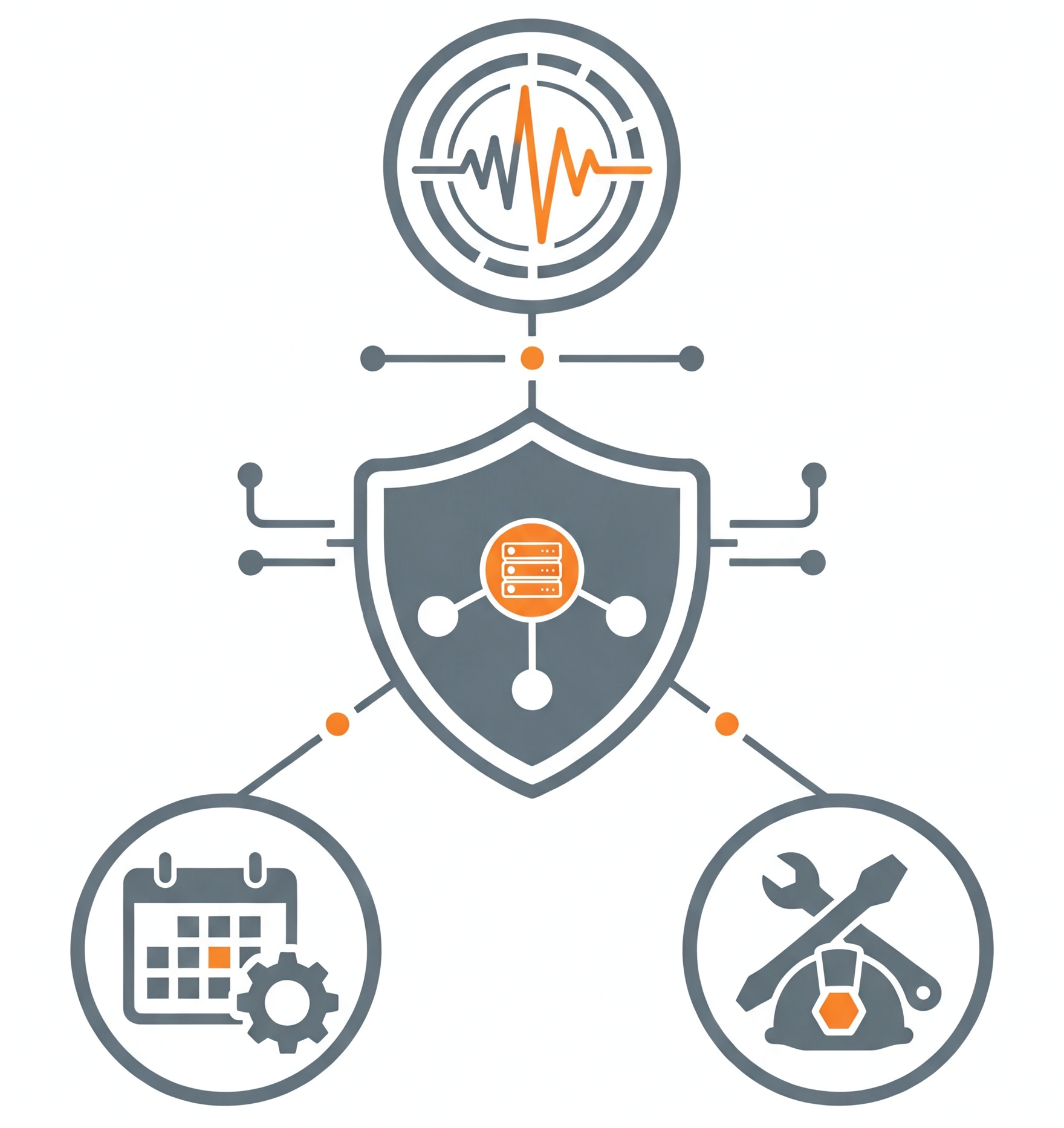
A campus network serving 20,000 or more users cannot rely on reactive, break-fix support. Proactive monitoring detects anomalies, such as unusual traffic patterns, authentication failures, or access point degradation, before they affect the user experience. Switchshop’s managed services provide 24/7 UK-based monitoring with automated alerting and escalation, backed by engineers who understand higher education network environments.
Term-Aware Delivery and Change Management
Network upgrades and maintenance in a university environment must be scheduled around the academic calendar. Deploying new access points during freshers’ week or upgrading core switches during exam season creates unacceptable risk. Experienced infrastructure partners plan rollouts around quiet vacation windows, with phased approaches that allow stress-testing in live environments before full deployment.
Configuration backup is equally important. Switchshop’s Configuration Backup as a Service (CBaaS) provides automated daily backups and rapid recovery options, ensuring that a misconfigured change or hardware failure never results in a prolonged outage.
In-House Engineering vs. Subcontracted Support
The distinction between a partner with an in-house engineering team and one that subcontracts delivery matters significantly in a campus environment. When a network issue affects teaching or research, the response must come from engineers who understand the specific architecture, not from a third-party contractor reading documentation for the first time.
Switchshop’s 100% in-house UK-wide engineering team designs, deploys, and supports every solution. This end-to-end accountability means the same engineers who designed the network are the ones who resolve incidents and plan upgrades, providing continuity that subcontracted models cannot match.
Compliant Procurement Routes for University Network Infrastructure
Public sector procurement regulations add a layer of complexity to university IT purchasing. Framework agreements simplify this process by providing pre-approved, legally compliant routes to market that reduce tendering timescales and administrative burden.

The Jisc Network Solutions Framework
The Jisc Network Solutions Framework, launched in June 2025, offers UK universities and research institutions a compliant route to procure network equipment and associated services. The framework covers wired and wireless infrastructure, firewalls, transceivers, cabling, professional services, and fully managed solutions.
Switchshop holds the top-ranked supplier position on Lot 3 (HPE Aruba Networking) and Lot 6 (Fortinet Equipment, Maintenance and Support Services), enabling direct award procurement without a full tendering process. For universities under pressure to deliver network upgrades within tight funding windows, this direct-award capability can reduce procurement timescales significantly.
Crown Commercial Service and NHS SBS
For universities that also procure alongside NHS trusts (for teaching hospitals) or central government bodies, Switchshop is approved on Crown Commercial Service frameworks including G-Cloud and Technology Products and Associated Services. NHS Shared Business Services approval covers IT infrastructure and managed services for university-hospital partnerships.
Planning for Peak Demand: A Step-by-Step Approach
Designing a BYOD campus network that performs reliably under peak demand requires a structured methodology. The following steps provide a practical framework for IT directors and network managers.

Step 1: Audit Current Infrastructure and Baseline Performance
Before designing any changes, capture baseline metrics: current uptime percentages, per-building throughput, peak authentication volumes, and per-SSID client counts. This data provides the reference point against which improvements are measured and helps justify investment to senior leadership.

Step 2: Model Peak Demand Scenarios
Use historical enrolment data, timetabling information, and device-per-student ratios to model the worst-case demand your network must support. Account for growth: student device counts have increased year on year, and IoT deployments for smart estates and environmental monitoring are expanding the connected device population further.

Step 3: Design for Segmentation and Redundancy
Architect the network with separate VLANs for staff, students, guests, and IoT. Plan dual uplinks at every tier. Ensure the core and distribution layers include automatic failover. Document the design so that any engineer, not just the original designer, can understand and maintain the architecture.

Step 4: Deploy Certificate-Based BYOD Onboarding
Replace password-based BYOD authentication with certificate-based onboarding to strengthen security and reduce helpdesk calls. Automated platforms such as MySSP Onboard handle the complexity of multi-OS certificate delivery without requiring manual IT intervention for each device.

Step 5: Establish Ongoing Monitoring and Review Cycles
Deploy monitoring tools that capture real-time and historical performance data across every building, SSID, and VLAN. Schedule termly reviews with stakeholders from IT, estates, and academic departments to translate technical metrics into operational improvements. Continuous measurement is the only way to identify localised issues before they escalate.
Key Metrics for Measuring Campus Network Performance
Investment in campus network infrastructure is only justified when performance can be measured and communicated clearly to institutional leadership. The following benchmarks represent what high-performing UK university networks achieve.
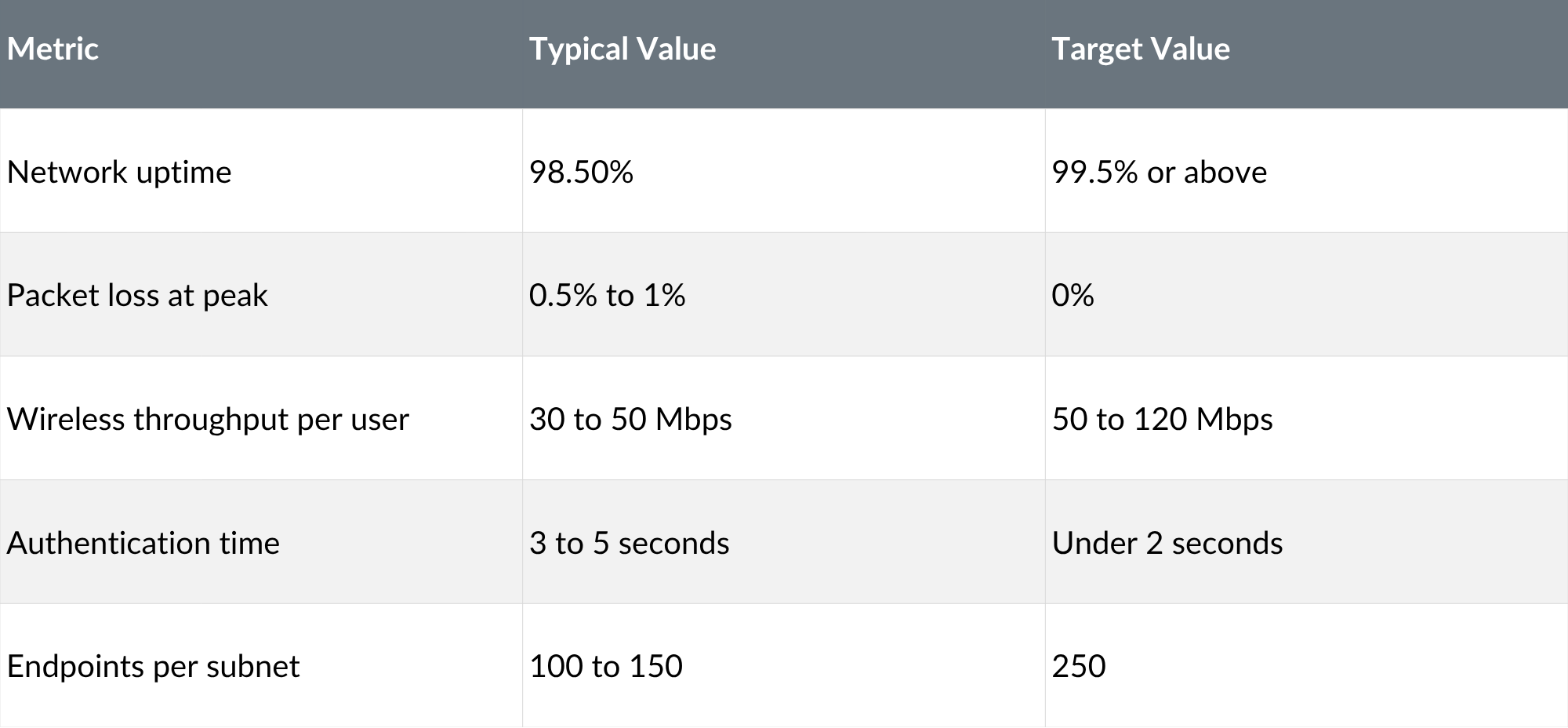
A common mistake is focusing exclusively on uptime percentages while ignoring user-level experience. A network can report 99.5% uptime while users in a specific lecture theatre consistently experience slow speeds or failed authentications. Per-building and per-SSID metrics, reviewed regularly, reveal these localised problems before they become institutional complaints.
How Switchshop Supports UK University Campus Networks
Switchshop designs, deploys, and supports campus network infrastructure for UK universities and colleges. With 25+ years of sector experience, 137 technical certifications, and the highest Fortinet and HPE Aruba accreditations in the country, the in-house engineering team delivers end-to-end accountability from initial site survey through to ongoing managed support.
Documented outcomes across the higher education sector include a campus-wide eduroam Wi-Fi 6E refresh for a Russell Group university (2,500+ access points, 40,000+ daily devices, zero teaching disruption) and multi-campus SD-WAN unifying 12 sites under a single managed platform with 99.99% core availability. These are delivered through Switchshop’s smart camprus approach, which integrates networking, security, and estate analytics into one coordinated programme.
As the top-ranked supplier on Jisc Lots 3 and 6, Switchshop offers universities a direct-award procurement route that reduces timescales and ensures compliance. The UK-based help desk and 24/7 monitoring service provide the ongoing support that campus networks require year-round.